集合是一种内容类型(文章、页面、产品)。其字段定义设定了每个条目数据的结构。
创建集合
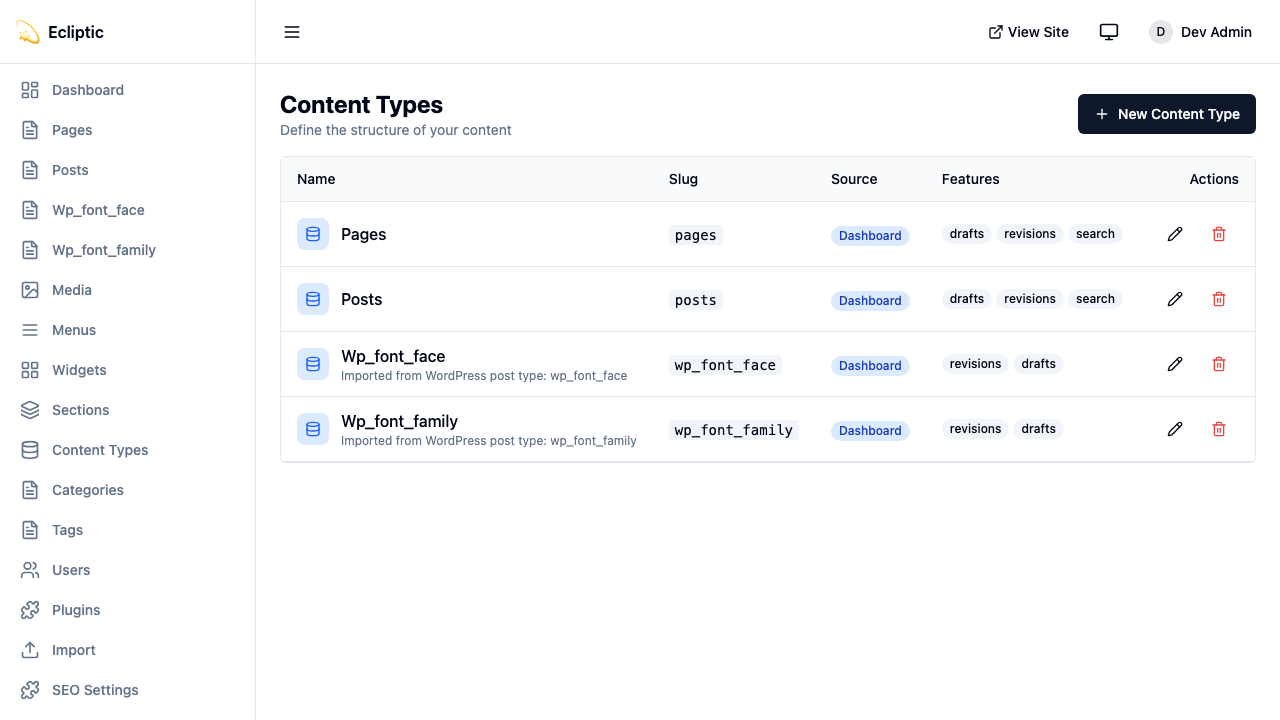
通过管理面板的 Content Types 创建集合。每个集合具有以下属性:
| 属性 | 描述 |
|---|---|
slug | URL 安全标识符(例如 posts、products) |
label | 显示名称(例如 “Blog Posts”) |
labelSingular | 单数形式(例如 “Post”) |
description | 面向编辑者的可选描述 |
icon | 管理侧边栏的 Lucide 图标名称 |
supports | 草稿、修订、预览、定时发布、搜索、SEO 等功能 |
集合功能
创建集合时,启用你需要的功能:
| 功能 | 描述 |
|---|---|
drafts | 启用草稿/发布工作流 |
revisions | 通过版本快照追踪内容历史 |
preview | 为草稿内容生成签名预览 URL |
scheduling | 将内容安排在未来日期发布 |
以下集合启用了所有四项功能:
{
  slug: "posts",
  label: "Blog Posts",
  labelSingular: "Post",
  supports: ["drafts", "revisions", "preview", "scheduling"]
}
字段类型
EmDash 支持 16 种字段类型,映射到 SQLite 列类型。
文本字段
string
短文本输入。映射到 TEXT 列。
{ slug: "title", type: "string", label: "Title" }text
多行文本区域。映射到 TEXT 列。
{ slug: "excerpt", type: "text", label: "Excerpt" }slug
URL 安全的 slug 字段。映射到 TEXT 列。
{ slug: "handle", type: "slug", label: "URL Handle" }富内容
portableText
富文本编辑器(TipTap/ProseMirror)。以 JSON 存储。
{ slug: "content", type: "portableText", label: "Content" }Portable Text 是一种基于块的格式,在不嵌入 HTML 的情况下保留结构。
json
任意 JSON 数据。以 JSON 存储。
{ slug: "metadata", type: "json", label: "Custom Metadata" }数字
number
十进制数。映射到 REAL 列。
{ slug: "price", type: "number", label: "Price" }integer
整数。映射到 INTEGER 列。
{ slug: "quantity", type: "integer", label: "Stock Quantity" }布尔值和日期
boolean
真/假开关。映射到 INTEGER(0/1)。
{ slug: "featured", type: "boolean", label: "Featured Post" }datetime
日期时间选择器。以 ISO 8601 字符串存储。
{ slug: "eventDate", type: "datetime", label: "Event Date" }选择
select
从列表中选择单个选项。映射到 TEXT 列。
{
  slug: "status",
  type: "select",
  label: "Product Status",
  validation: {
    options: ["active", "discontinued", "coming_soon"]
  }
}
multiSelect
从列表中选择多个选项。以 JSON 数组存储。
{
  slug: "features",
  type: "multiSelect",
  label: "Product Features",
  validation: {
    options: ["wireless", "waterproof", "eco-friendly"]
  }
}
媒体和引用
image
从媒体库选择图片。将媒体 ID 存储为 TEXT。
{ slug: "featuredImage", type: "image", label: "Featured Image" }file
从媒体库选择文件。将媒体 ID 存储为 TEXT。
{ slug: "attachment", type: "file", label: "PDF Attachment" }reference
引用另一个集合的条目。将条目 ID 存储为 TEXT。
{
  slug: "author",
  type: "reference",
  label: "Author",
  options: {
    collection: "authors"
  }
}
字段属性
每个字段都支持这些属性:
| 属性 | 类型 | 描述 |
|---|---|---|
slug | string | 数据库中的列名 |
label | string | 管理界面中的显示标签 |
type | FieldType | 16 种字段类型之一 |
required | boolean | 字段是否必须有值 |
unique | boolean | 值在条目间是否必须唯一 |
indexed | boolean | 允许按此字段进行高效排序和过滤 |
defaultValue | unknown | 新条目的默认值 |
validation | object | 特定类型的验证规则 |
widget | string | 自定义小部件标识符 |
options | object | 特定小部件的配置 |
sortOrder | number | 编辑器中的显示顺序 |
当集合查询需要在 orderBy 或字段过滤器中使用自定义字段时,设置 indexed: true。索引支持 string、url、number、integer、boolean、datetime、select、reference 和 slug 字段。EmDash 拒绝索引 JSON、富内容和其他非标量字段类型。
验证规则
validation 对象因字段类型而异。其完整形式为:
interface FieldValidation {
	required?: boolean; // 所有类型
	min?: number; // number, integer
	max?: number; // number, integer
	minLength?: number; // string, text
	maxLength?: number; // string, text
	pattern?: string; // string(正则表达式)
	options?: string[]; // select, multiSelect
}
以下字段要求一个唯一的、通过模式匹配验证的电子邮件地址:
{
  slug: "email",
  type: "string",
  label: "Email Address",
  required: true,
  unique: true,
  validation: {
    pattern: "^[a-zA-Z0-9._%+-]+@[a-zA-Z0-9.-]+\\.[a-zA-Z]{2,}$"
  }
}
小部件选项
options 对象配置字段特定的 UI 行为。其完整形式为:
interface FieldWidgetOptions {
	rows?: number; // text(文本区域行数)
	showPreview?: boolean; // image, file
	collection?: string; // reference(目标集合)
	allowMultiple?: boolean; // reference(多个引用)
	[key: string]: unknown; // 自定义小部件选项
}
以下引用字段链接到多个产品:
{
  slug: "relatedProducts",
  type: "reference",
  label: "Related Products",
  options: {
    collection: "products",
    allowMultiple: true
  }
}
查询集合
使用提供的查询函数来获取内容。这些遵循 Astro 的实时集合模式,返回结构化结果。以下示例显示了常见的查询选项:
import { getEmDashCollection, getEmDashEntry } from "emdash";

// 获取所有条目 - 返回 { entries, error }
const { entries: posts } = await getEmDashCollection("posts");

// 按状态过滤
const { entries: drafts } = await getEmDashCollection("posts", {
	status: "draft",
});

// 限制结果
const { entries: recent } = await getEmDashCollection("posts", {
	limit: 5,
});

// 按分类法过滤
const { entries: newsPosts } = await getEmDashCollection("posts", {
	where: { category: "news" },
});

// 通过 slug 获取单个条目 - 返回 { entry, error, isPreview }
const { entry: post } = await getEmDashEntry("posts", "my-post-slug");

// 错误处理
const { entries, error } = await getEmDashCollection("posts");
if (error) {
	console.error("Failed to load posts:", error);
}
类型生成
运行 npx emdash types 从你的 schema 生成 TypeScript 类型。生成的文件每个集合包含一个接口:
export interface Post {
	title: string;
	content: PortableTextBlock[];
	excerpt?: string;
	featuredImage?: string;
	author: string; // 引用 ID
}

export interface Product {
	title: string;
	price: number;
	description: PortableTextBlock[];
}数据库映射
字段类型映射到 SQLite 列类型如下:
| 字段类型 | SQLite 类型 | 备注 |
|---|---|---|
string | TEXT | |
text | TEXT | |
slug | TEXT | |
url | TEXT | |
number | REAL | 64 位浮点数 |
integer | INTEGER | 64 位有符号整数 |
boolean | INTEGER | 0 或 1 |
datetime | TEXT | ISO 8601 格式 |
select | TEXT | |
multiSelect | JSON | 字符串数组 |
portableText | JSON | 块数组 |
image | TEXT | 媒体 ID |
file | TEXT | 媒体 ID |
reference | TEXT | 条目 ID |
json | JSON | 任意 JSON |
repeater | JSON | 子字段数组 |