集合是一種內容類型(文章、頁面、產品)。其欄位定義設定了每個條目資料的結構。
建立集合
透過管理面板的 Content Types 建立集合。每個集合具有以下屬性:
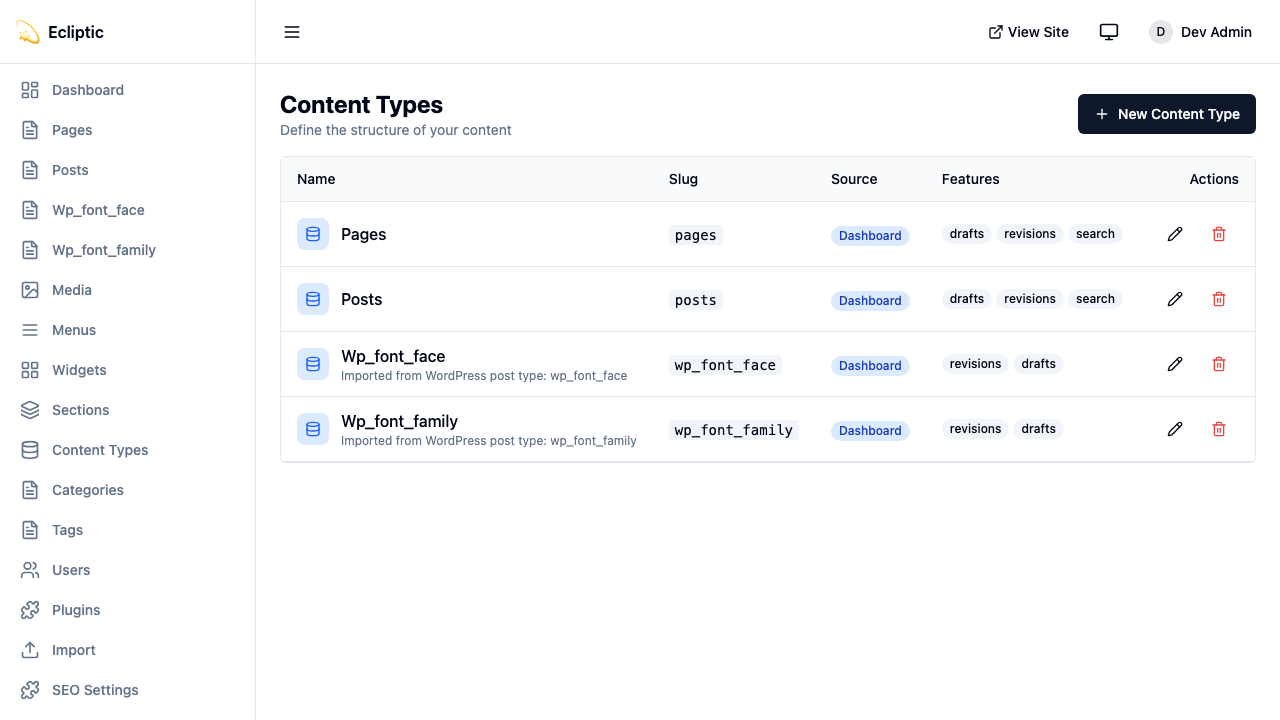
| 屬性 | 描述 |
|---|---|
slug | URL 安全識別碼(例如 posts、products) |
label | 顯示名稱(例如 “Blog Posts”) |
labelSingular | 單數形式(例如 “Post”) |
description | 面向編輯者的選用描述 |
icon | 管理側邊欄的 Lucide 圖示名稱 |
supports | 草稿、修訂、預覽、排程發佈、搜尋、SEO 等功能 |
集合功能
建立集合時,啟用你需要的功能:
| 功能 | 描述 |
|---|---|
drafts | 啟用草稿/發佈工作流程 |
revisions | 透過版本快照追蹤內容歷史 |
preview | 為草稿內容產生簽署預覽 URL |
scheduling | 將內容排程在未來日期發佈 |
以下集合啟用了所有四項功能:
{
  slug: "posts",
  label: "Blog Posts",
  labelSingular: "Post",
  supports: ["drafts", "revisions", "preview", "scheduling"]
}
欄位類型
EmDash 支援 16 種欄位類型,對應到 SQLite 欄位類型。
文字欄位
string
短文字輸入。對應到 TEXT 欄位。
{ slug: "title", type: "string", label: "Title" }text
多行文字區域。對應到 TEXT 欄位。
{ slug: "excerpt", type: "text", label: "Excerpt" }slug
URL 安全的 slug 欄位。對應到 TEXT 欄位。
{ slug: "handle", type: "slug", label: "URL Handle" }富內容
portableText
富文字編輯器(TipTap/ProseMirror)。以 JSON 儲存。
{ slug: "content", type: "portableText", label: "Content" }Portable Text 是一種基於區塊的格式,在不嵌入 HTML 的情況下保留結構。
json
任意 JSON 資料。以 JSON 儲存。
{ slug: "metadata", type: "json", label: "Custom Metadata" }數字
number
十進位數。對應到 REAL 欄位。
{ slug: "price", type: "number", label: "Price" }integer
整數。對應到 INTEGER 欄位。
{ slug: "quantity", type: "integer", label: "Stock Quantity" }布林值和日期
boolean
真/假切換。對應到 INTEGER(0/1)。
{ slug: "featured", type: "boolean", label: "Featured Post" }datetime
日期時間選擇器。以 ISO 8601 字串儲存。
{ slug: "eventDate", type: "datetime", label: "Event Date" }選擇
select
從清單中選擇單一選項。對應到 TEXT 欄位。
{
  slug: "status",
  type: "select",
  label: "Product Status",
  validation: {
    options: ["active", "discontinued", "coming_soon"]
  }
}
multiSelect
從清單中選擇多個選項。以 JSON 陣列儲存。
{
  slug: "features",
  type: "multiSelect",
  label: "Product Features",
  validation: {
    options: ["wireless", "waterproof", "eco-friendly"]
  }
}
媒體和參照
image
從媒體庫選擇圖片。將媒體 ID 儲存為 TEXT。
{ slug: "featuredImage", type: "image", label: "Featured Image" }file
從媒體庫選擇檔案。將媒體 ID 儲存為 TEXT。
{ slug: "attachment", type: "file", label: "PDF Attachment" }reference
參照另一個集合的條目。將條目 ID 儲存為 TEXT。
{
  slug: "author",
  type: "reference",
  label: "Author",
  options: {
    collection: "authors"
  }
}
欄位屬性
每個欄位都支援這些屬性:
| 屬性 | 類型 | 描述 |
|---|---|---|
slug | string | 資料庫中的欄位名稱 |
label | string | 管理介面中的顯示標籤 |
type | FieldType | 16 種欄位類型之一 |
required | boolean | 欄位是否必須有值 |
unique | boolean | 值在條目間是否必須唯一 |
indexed | boolean | 允許按此欄位進行高效排序和篩選 |
defaultValue | unknown | 新條目的預設值 |
validation | object | 特定類型的驗證規則 |
widget | string | 自訂小工具識別碼 |
options | object | 特定小工具的設定 |
sortOrder | number | 編輯器中的顯示順序 |
當集合查詢需要在 orderBy 或欄位篩選器中使用自訂欄位時,設定 indexed: true。索引支援 string、url、number、integer、boolean、datetime、select、reference 和 slug 欄位。EmDash 拒絕索引 JSON、富內容和其他非純量欄位類型。
驗證規則
validation 物件因欄位類型而異。其完整形式為:
interface FieldValidation {
	required?: boolean; // 所有類型
	min?: number; // number, integer
	max?: number; // number, integer
	minLength?: number; // string, text
	maxLength?: number; // string, text
	pattern?: string; // string(正規表達式)
	options?: string[]; // select, multiSelect
}
以下欄位要求一個唯一的、透過模式匹配驗證的電子郵件地址:
{
  slug: "email",
  type: "string",
  label: "Email Address",
  required: true,
  unique: true,
  validation: {
    pattern: "^[a-zA-Z0-9._%+-]+@[a-zA-Z0-9.-]+\\.[a-zA-Z]{2,}$"
  }
}
小工具選項
options 物件設定欄位特定的 UI 行為。其完整形式為:
interface FieldWidgetOptions {
	rows?: number; // text(文字區域行數)
	showPreview?: boolean; // image, file
	collection?: string; // reference(目標集合)
	allowMultiple?: boolean; // reference(多個參照)
	[key: string]: unknown; // 自訂小工具選項
}
以下參照欄位連結到多個產品:
{
  slug: "relatedProducts",
  type: "reference",
  label: "Related Products",
  options: {
    collection: "products",
    allowMultiple: true
  }
}
查詢集合
使用提供的查詢函式來取得內容。這些遵循 Astro 的即時集合模式,傳回結構化結果。以下範例顯示了常見的查詢選項:
import { getEmDashCollection, getEmDashEntry } from "emdash";

// 取得所有條目 - 傳回 { entries, error }
const { entries: posts } = await getEmDashCollection("posts");

// 按狀態篩選
const { entries: drafts } = await getEmDashCollection("posts", {
	status: "draft",
});

// 限制結果
const { entries: recent } = await getEmDashCollection("posts", {
	limit: 5,
});

// 按分類法篩選
const { entries: newsPosts } = await getEmDashCollection("posts", {
	where: { category: "news" },
});

// 透過 slug 取得單一條目 - 傳回 { entry, error, isPreview }
const { entry: post } = await getEmDashEntry("posts", "my-post-slug");

// 錯誤處理
const { entries, error } = await getEmDashCollection("posts");
if (error) {
	console.error("Failed to load posts:", error);
}
類型產生
執行 npx emdash types 從你的 schema 產生 TypeScript 類型。產生的檔案每個集合包含一個介面:
export interface Post {
	title: string;
	content: PortableTextBlock[];
	excerpt?: string;
	featuredImage?: string;
	author: string; // 參照 ID
}

export interface Product {
	title: string;
	price: number;
	description: PortableTextBlock[];
}資料庫對應
欄位類型對應到 SQLite 欄位類型如下:
| 欄位類型 | SQLite 類型 | 備註 |
|---|---|---|
string | TEXT | |
text | TEXT | |
slug | TEXT | |
url | TEXT | |
number | REAL | 64 位元浮點數 |
integer | INTEGER | 64 位元帶符號整數 |
boolean | INTEGER | 0 或 1 |
datetime | TEXT | ISO 8601 格式 |
select | TEXT | |
multiSelect | JSON | 字串陣列 |
portableText | JSON | 區塊陣列 |
image | TEXT | 媒體 ID |
file | TEXT | 媒體 ID |
reference | TEXT | 條目 ID |
json | JSON | 任意 JSON |
repeater | JSON | 子欄位陣列 |