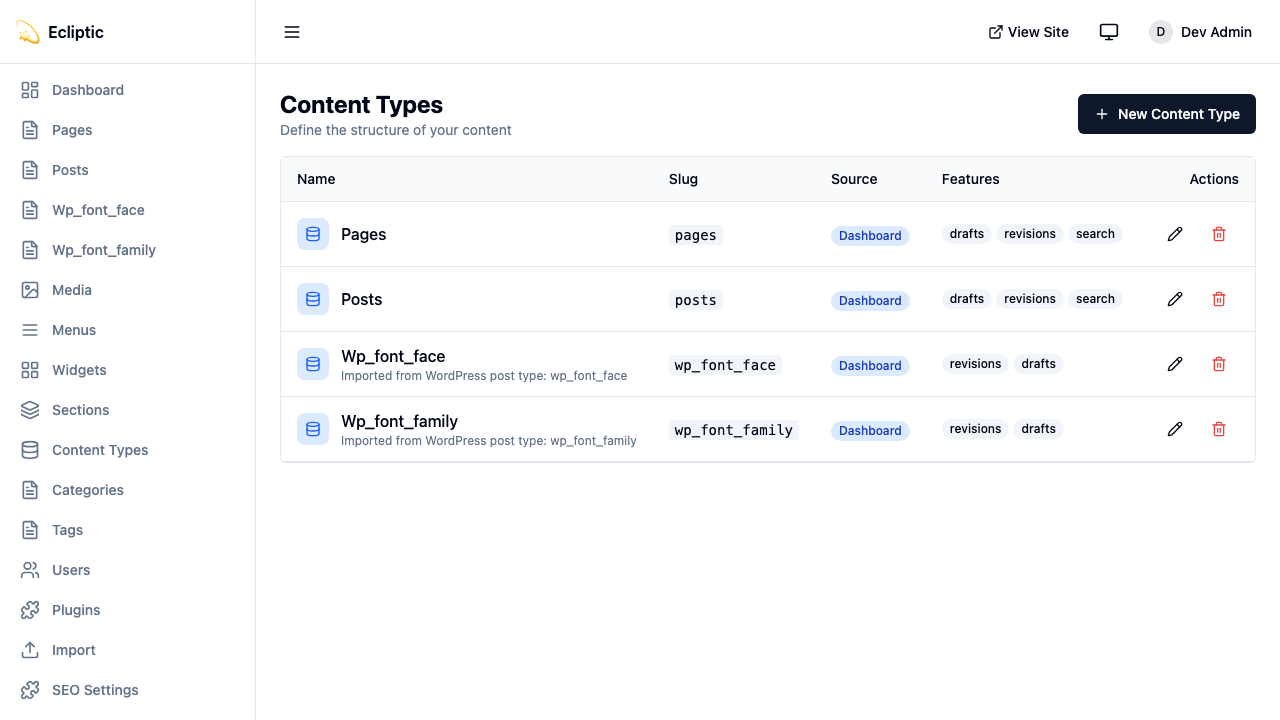
コレクションはコンテンツタイプ(投稿、ページ、商品)です。そのフィールド定義が各エントリのデータの形状を設定します。
コレクションの作成
管理パネルのContent Typesでコレクションを作成します。各コレクションには以下のプロパティがあります:
| プロパティ | 説明 |
|---|---|
slug | URL安全な識別子(例:posts、products) |
label | 表示名(例:“Blog Posts”) |
labelSingular | 単数形(例:“Post”) |
description | エディター向けのオプション説明 |
icon | 管理サイドバー用のLucideアイコン名 |
supports | ドラフト、リビジョン、プレビュー、スケジュール、検索、SEOなどの機能 |
コレクション機能
コレクションを作成する際に、必要な機能を有効にします:
| 機能 | 説明 |
|---|---|
drafts | ドラフト/公開ワークフローを有効にする |
revisions | バージョンスナップショットでコンテンツ履歴を追跡する |
preview | ドラフトコンテンツの署名付きプレビューURLを生成する |
scheduling | 将来の日付にコンテンツの公開をスケジュールする |
以下のコレクションは4つすべての機能を有効にします:
{
  slug: "posts",
  label: "Blog Posts",
  labelSingular: "Post",
  supports: ["drafts", "revisions", "preview", "scheduling"]
}
フィールドタイプ
EmDashはSQLiteカラムタイプにマッピングされる16のフィールドタイプをサポートしています。
テキストフィールド
string
短いテキスト入力。TEXTカラムにマッピングされます。
{ slug: "title", type: "string", label: "Title" }text
複数行テキストエリア。TEXTカラムにマッピングされます。
{ slug: "excerpt", type: "text", label: "Excerpt" }slug
URL安全なslugフィールド。TEXTカラムにマッピングされます。
{ slug: "handle", type: "slug", label: "URL Handle" }リッチコンテンツ
portableText
リッチテキストエディター(TipTap/ProseMirror)。JSONとして保存されます。
{ slug: "content", type: "portableText", label: "Content" }Portable TextはHTMLを埋め込まずに構造を保持するブロックベースのフォーマットです。
json
任意のJSONデータ。JSONとして保存されます。
{ slug: "metadata", type: "json", label: "Custom Metadata" }数値
number
10進数。REALカラムにマッピングされます。
{ slug: "price", type: "number", label: "Price" }integer
整数。INTEGERカラムにマッピングされます。
{ slug: "quantity", type: "integer", label: "Stock Quantity" }ブーリアンと日付
boolean
真/偽トグル。INTEGER(0/1)にマッピングされます。
{ slug: "featured", type: "boolean", label: "Featured Post" }datetime
日時ピッカー。ISO 8601文字列として保存されます。
{ slug: "eventDate", type: "datetime", label: "Event Date" }選択
select
リストからの単一オプション。TEXTカラムにマッピングされます。
{
  slug: "status",
  type: "select",
  label: "Product Status",
  validation: {
    options: ["active", "discontinued", "coming_soon"]
  }
}
multiSelect
リストからの複数オプション。JSON配列として保存されます。
{
  slug: "features",
  type: "multiSelect",
  label: "Product Features",
  validation: {
    options: ["wireless", "waterproof", "eco-friendly"]
  }
}
メディアと参照
image
メディアライブラリからの画像ピッカー。メディアIDをTEXTとして保存します。
{ slug: "featuredImage", type: "image", label: "Featured Image" }file
メディアライブラリからのファイルピッカー。メディアIDをTEXTとして保存します。
{ slug: "attachment", type: "file", label: "PDF Attachment" }reference
別のコレクションのエントリへの参照。エントリIDをTEXTとして保存します。
{
  slug: "author",
  type: "reference",
  label: "Author",
  options: {
    collection: "authors"
  }
}
フィールドプロパティ
すべてのフィールドがこれらのプロパティをサポートしています:
| プロパティ | 型 | 説明 |
|---|---|---|
slug | string | データベースのカラム名 |
label | string | 管理UIでの表示ラベル |
type | FieldType | 16のフィールドタイプの1つ |
required | boolean | フィールドに値が必要かどうか |
unique | boolean | エントリ間で値が一意である必要があるかどうか |
indexed | boolean | このフィールドによる効率的なソートとフィルタリングを可能にする |
defaultValue | unknown | 新しいエントリのデフォルト値 |
validation | object | タイプ固有のバリデーションルール |
widget | string | カスタムウィジェット識別子 |
options | object | ウィジェット固有の設定 |
sortOrder | number | エディターでの表示順序 |
コレクションクエリがorderByまたはフィールドフィルターでカスタムフィールドを使用する必要がある場合、indexed: trueを設定してください。インデックスはstring、url、number、integer、boolean、datetime、select、reference、slugフィールドでサポートされています。EmDashはインデックス付きJSON、リッチコンテンツ、その他の非スカラーフィールドタイプを拒否します。
バリデーションルール
validationオブジェクトはフィールドタイプによって異なります。その完全な形状は:
interface FieldValidation {
	required?: boolean; // すべてのタイプ
	min?: number; // number, integer
	max?: number; // number, integer
	minLength?: number; // string, text
	maxLength?: number; // string, text
	pattern?: string; // string(正規表現)
	options?: string[]; // select, multiSelect
}
以下のフィールドは、一意でパターンマッチされたメールアドレスを要求します:
{
  slug: "email",
  type: "string",
  label: "Email Address",
  required: true,
  unique: true,
  validation: {
    pattern: "^[a-zA-Z0-9._%+-]+@[a-zA-Z0-9.-]+\\.[a-zA-Z]{2,}$"
  }
}
ウィジェットオプション
optionsオブジェクトはフィールド固有のUI動作を設定します。その完全な形状は:
interface FieldWidgetOptions {
	rows?: number; // text(テキストエリアの行数)
	showPreview?: boolean; // image, file
	collection?: string; // reference(ターゲットコレクション)
	allowMultiple?: boolean; // reference(複数参照)
	[key: string]: unknown; // カスタムウィジェットオプション
}
以下の参照フィールドは複数の商品にリンクします:
{
  slug: "relatedProducts",
  type: "reference",
  label: "Related Products",
  options: {
    collection: "products",
    allowMultiple: true
  }
}
コレクションのクエリ
提供されたクエリ関数を使用してコンテンツを取得します。これらはAstroのライブコレクションパターンに従い、構造化された結果を返します。以下の例は一般的なクエリオプションを示しています:
import { getEmDashCollection, getEmDashEntry } from "emdash";

// すべてのエントリを取得 - { entries, error } を返す
const { entries: posts } = await getEmDashCollection("posts");

// ステータスでフィルター
const { entries: drafts } = await getEmDashCollection("posts", {
	status: "draft",
});

// 結果を制限
const { entries: recent } = await getEmDashCollection("posts", {
	limit: 5,
});

// タクソノミーでフィルター
const { entries: newsPosts } = await getEmDashCollection("posts", {
	where: { category: "news" },
});

// slugで単一エントリを取得 - { entry, error, isPreview } を返す
const { entry: post } = await getEmDashEntry("posts", "my-post-slug");

// エラーハンドリング
const { entries, error } = await getEmDashCollection("posts");
if (error) {
	console.error("Failed to load posts:", error);
}
型生成
npx emdash typesを実行してスキーマからTypeScript型を生成します。生成されたファイルにはコレクションごとに1つのインターフェースが含まれます:
export interface Post {
	title: string;
	content: PortableTextBlock[];
	excerpt?: string;
	featuredImage?: string;
	author: string; // 参照ID
}

export interface Product {
	title: string;
	price: number;
	description: PortableTextBlock[];
}データベースマッピング
フィールドタイプは以下のようにSQLiteカラムタイプにマッピングされます:
| フィールドタイプ | SQLiteタイプ | 備考 |
|---|---|---|
string | TEXT | |
text | TEXT | |
slug | TEXT | |
url | TEXT | |
number | REAL | 64ビット浮動小数点 |
integer | INTEGER | 64ビット符号付き整数 |
boolean | INTEGER | 0または1 |
datetime | TEXT | ISO 8601形式 |
select | TEXT | |
multiSelect | JSON | 文字列の配列 |
portableText | JSON | ブロック配列 |
image | TEXT | メディアID |
file | TEXT | メディアID |
reference | TEXT | エントリID |
json | JSON | 任意のJSON |
repeater | JSON | サブフィールドの配列 |