이 가이드는 콘텐츠 유형 정의부터 카테고리와 태그를 사용한 게시물 표시까지, EmDash로 블로그를 만드는 방법을 다룹니다.
사전 요구 사항
- EmDash 사이트가 설정되고 실행 중일 것 (시작하기 참조)
- Astro 컴포넌트에 대한 기본적인 이해
Posts Collection 정의
EmDash는 설정 시 기본 “posts” collection을 생성합니다. 관리자 대시보드 또는 API에서 커스터마이즈할 수 있습니다.
기본 posts collection에는 다음이 포함됩니다:
title- 게시물 제목slug- URL 친화적 식별자content- 리치 텍스트 본문excerpt- 짧은 설명featured_image- 헤더 이미지 (선택 사항)status- 초안, 게시됨, 또는 예약됨publishedAt- 게시 날짜 (시스템 필드)
첫 번째 게시물 작성
-
/_emdash/admin에서 관리자 대시보드 열기 -
사이드바에서 Posts 클릭
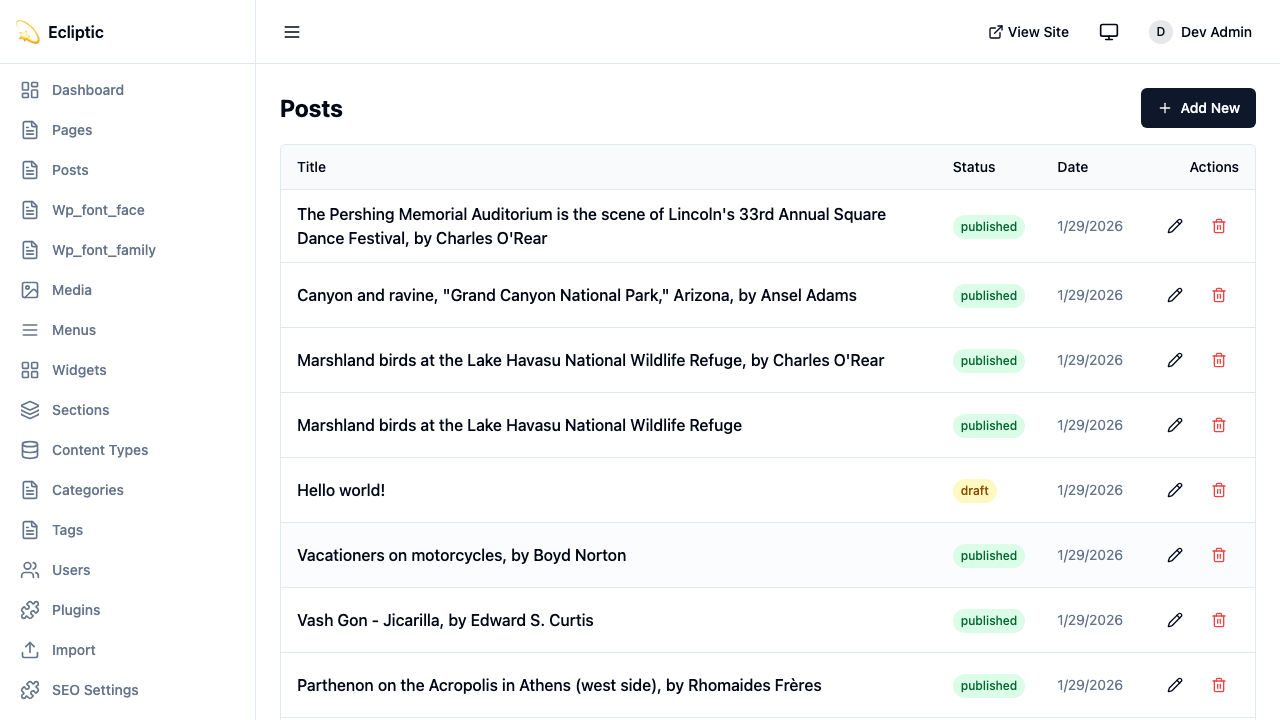
-
New Post 클릭
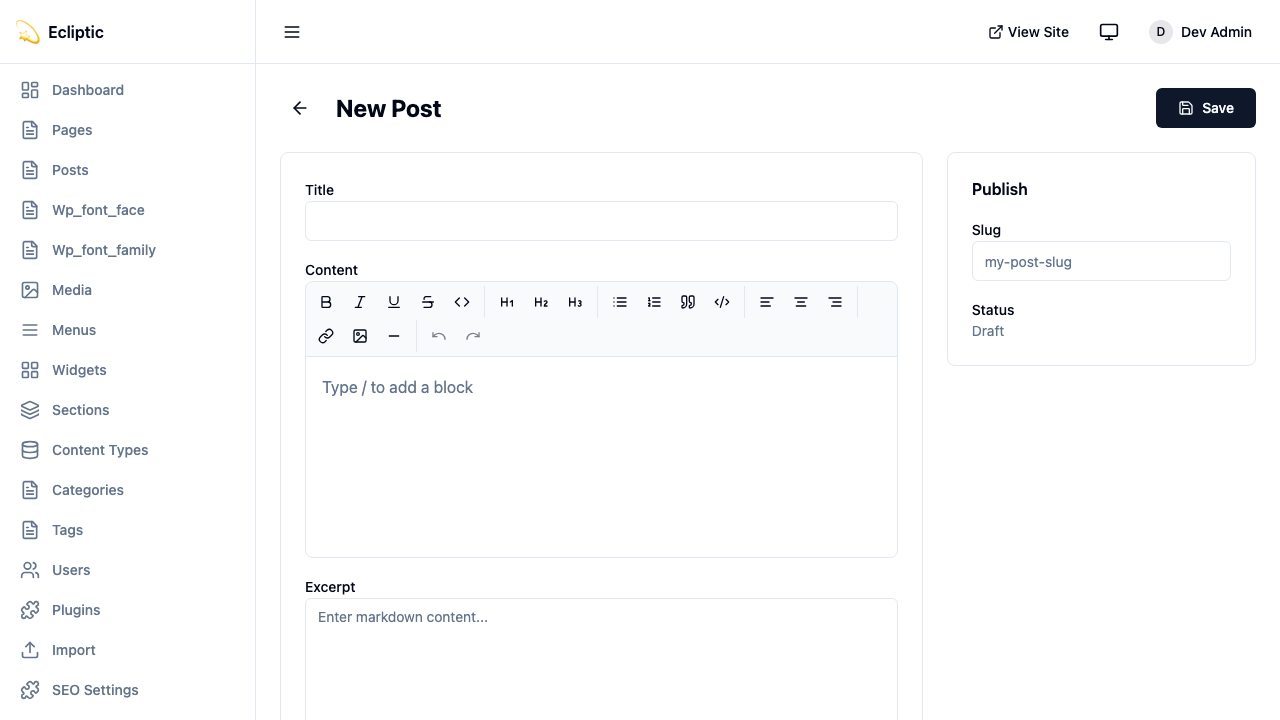
-
제목을 입력하고 리치 텍스트 편집기를 사용하여 콘텐츠 작성
-
사이드바 패널에서 카테고리와 태그 추가
-
상태를 게시됨으로 설정
-
저장 클릭
게시물이 즉시 라이브 상태가 되어 바로 표시됩니다.
사이트에 게시물 표시하기
모든 게시물 나열
다음 페이지는 모든 게시된 게시물을 표시합니다:
---
import { getEmDashCollection } from "emdash";
import Base from "../../layouts/Base.astro";

const { entries: posts } = await getEmDashCollection("posts", {
  status: "published",
});

// 게시 날짜순으로 정렬, 최신 게시물 먼저
const sortedPosts = posts.sort(
  (a, b) => (b.data.publishedAt?.getTime() ?? 0) - (a.data.publishedAt?.getTime() ?? 0)
);
---

<Base title="블로그">
  <h1>블로그</h1>
  <ul>
    {sortedPosts.map((post) => (
      <li>
        <a href={`/blog/${post.data.slug}`}>
          <h2>{post.data.title}</h2>
          <p>{post.data.excerpt}</p>
          <time datetime={post.data.publishedAt?.toISOString()}>
            {post.data.publishedAt?.toLocaleDateString()}
          </time>
        </a>
      </li>
    ))}
  </ul>
</Base>
단일 게시물 표시
다음 동적 라우트는 개별 게시물을 렌더링합니다:
---
import { getEmDashCollection, getEmDashEntry } from "emdash";
import { PortableText, Image } from "emdash/ui";
import Base from "../../layouts/Base.astro";

export async function getStaticPaths() {
  const { entries: posts } = await getEmDashCollection("posts", {
    status: "published",
  });

  return posts.map((post) => ({
    params: { slug: post.data.slug },
  }));
}

const { slug } = Astro.params;
const { entry: post } = await getEmDashEntry("posts", slug);

if (!post) {
  return Astro.redirect("/404");
}
---

<Base title={post.data.title}>
  <article>
    {post.data.featured_image && (
      <Image image={post.data.featured_image} alt="" />
    )}
    <h1>{post.data.title}</h1>
    <time datetime={post.data.publishedAt?.toISOString()}>
      {post.data.publishedAt?.toLocaleDateString()}
    </time>
    <PortableText value={post.data.content} />
  </article>
</Base>카테고리와 태그 추가
EmDash에는 기본 제공 카테고리 및 태그 택소노미가 포함되어 있습니다. 용어 생성 및 관리에 대한 자세한 내용은 택소노미를 참조하세요.
카테고리별 게시물 필터링
다음 라우트는 단일 카테고리의 게시물을 나열합니다:
---
import { getEmDashCollection, getTerm, getTaxonomyTerms } from "emdash";
import Base from "../../layouts/Base.astro";

export async function getStaticPaths() {
  const categories = await getTaxonomyTerms("category");

  // 계층적 카테고리 평탄화
  const flatten = (terms) => terms.flatMap((t) => [t, ...flatten(t.children)]);

  return flatten(categories).map((cat) => ({
    params: { slug: cat.slug },
    props: { category: cat },
  }));
}

const { category } = Astro.props;

const { entries: posts } = await getEmDashCollection("posts", {
  status: "published",
  where: { category: category.slug },
});
---

<Base title={category.label}>
  <h1>{category.label}</h1>
  {category.description && <p>{category.description}</p>}

  <ul>
    {posts.map((post) => (
      <li>
        <a href={`/blog/${post.data.slug}`}>{post.data.title}</a>
      </li>
    ))}
  </ul>
</Base>
게시물 카테고리 표시
다음 컴포넌트는 게시물에 할당된 카테고리와 태그를 표시합니다:
---
import { getEntryTerms } from "emdash";

interface Props {
  postId: string;
}

const { postId } = Astro.props;
const categories = await getEntryTerms("posts", postId, "category");
const tags = await getEntryTerms("posts", postId, "tag");
---

<div class="post-meta">
  {categories.length > 0 && (
    <div class="categories">
      <span>카테고리:</span>
      {categories.map((cat) => (
        <a href={`/category/${cat.slug}`}>{cat.label}</a>
      ))}
    </div>
  )}

  {tags.length > 0 && (
    <div class="tags">
      <span>태그:</span>
      {tags.map((tag) => (
        <a href={`/tag/${tag.slug}`}>{tag.label}</a>
      ))}
    </div>
  )}
</div>
페이지네이션 추가
게시물이 많은 블로그의 경우, 다음 라우트로 게시물 목록을 페이지네이션합니다:
---
import { getEmDashCollection } from "emdash";
import Base from "../../../layouts/Base.astro";

const POSTS_PER_PAGE = 10;

export async function getStaticPaths() {
  const { entries: allPosts } = await getEmDashCollection("posts", {
    status: "published",
  });

  const totalPages = Math.ceil(allPosts.length / POSTS_PER_PAGE);

  return Array.from({ length: totalPages }, (_, i) => ({
    params: { page: String(i + 1) },
    props: { currentPage: i + 1, totalPages },
  }));
}

const { currentPage, totalPages } = Astro.props;

const { entries: allPosts } = await getEmDashCollection("posts", {
  status: "published",
});

const sortedPosts = allPosts.sort(
  (a, b) => (b.data.publishedAt?.getTime() ?? 0) - (a.data.publishedAt?.getTime() ?? 0)
);

const start = (currentPage - 1) * POSTS_PER_PAGE;
const posts = sortedPosts.slice(start, start + POSTS_PER_PAGE);
---

<Base title={`블로그 - ${currentPage}페이지`}>
  <h1>블로그</h1>

  <ul>
    {posts.map((post) => (
      <li>
        <a href={`/blog/${post.data.slug}`}>{post.data.title}</a>
      </li>
    ))}
  </ul>

  <nav>
    {currentPage > 1 && (
      <a href={`/blog/page/${currentPage - 1}`}>이전</a>
    )}
    <span>{currentPage} / {totalPages} 페이지</span>
    {currentPage < totalPages && (
      <a href={`/blog/page/${currentPage + 1}`}>다음</a>
    )}
  </nav>
</Base>
RSS 피드 추가
다음 엔드포인트는 블로그의 RSS 피드를 생성합니다:
import rss from "@astrojs/rss";
import { getEmDashCollection } from "emdash";

export async function GET(context) {
	const { entries: posts } = await getEmDashCollection("posts", {
		status: "published",
	});

	return rss({
		title: "내 블로그",
		description: "EmDash로 구축한 블로그",
		site: context.site,
		items: posts.map((post) => ({
			title: post.data.title,
			pubDate: post.data.publishedAt,
			description: post.data.excerpt,
			link: `/blog/${post.data.slug}`,
		})),
	});
}
피드는 @astrojs/rss 패키지에 의존합니다. 다음 명령으로 설치합니다:
npm install @astrojs/rss